A home for your next idea

Your idea.
An app you can use.

Build websites and apps with coding agents, in one workspace.
Start with what you want to make. Keep shaping it as you go.

Free to use on macOS, Windows and Linux. Connect your own coding-agent account.

A feel for the real workspace

Explore full screen ↗
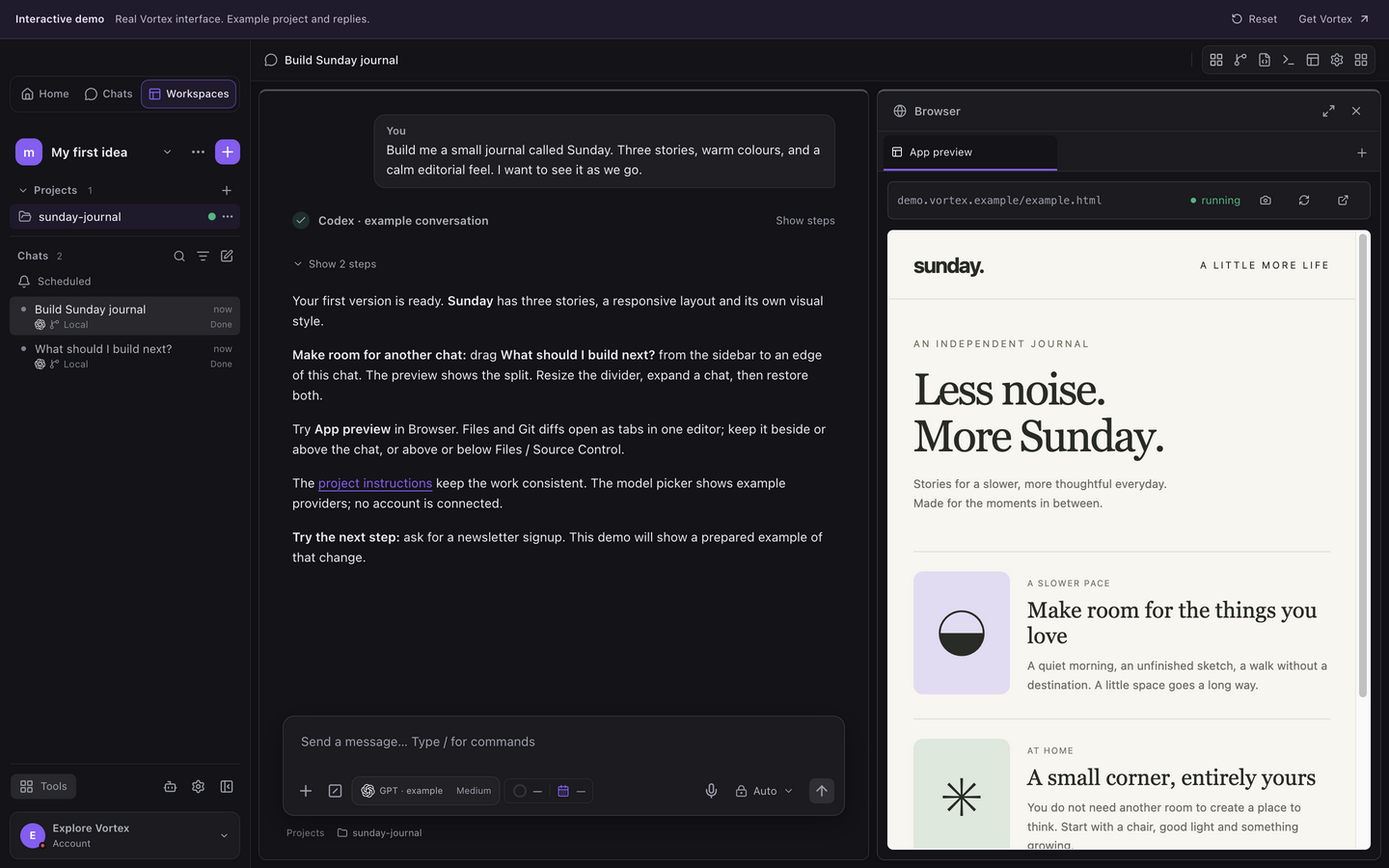
Vortex workspace with a project conversation and its app preview
Try it: open Files, switch the project and branch badges, or drag a second chat beside the first.Example workspace, separate working copies and prepared replies. No live agent, account or local file access.

YOUR AGENT. YOUR ACCOUNT. YOUR CHOICE.

CodexClaude CodeGoogle AntigravityGrok BuildKimi Code

Keep multiple account profiles for Codex and Claude Code. Use the provider icon and model picker in chat to choose the agent for your task. Your provider’s subscription and usage limits stay with that provider.

VIBE CODING, FROM IDEA TO PREVIEW

Start in plain language.
Keep going in your own way.

You don’t need to have the whole app figured out. Start with one useful thing, see it working, then decide what comes next. Vortex keeps the conversation, the project and the result together.

01 / DESCRIBE

Tell it what you have in mind.

A booking page for your studio. A dashboard for your business. That small tool you keep wishing someone would make. Explain who it’s for and what they should be able to do.

“Build a simple app to track my freelance projects, with a deadline and a status for each one.”
02 / BUILD

Work with an agent, step by step.

Choose your connected coding agent. Let it create the project and guide the setup, or bring a folder you already have. Follow its progress, answer questions and steer the work as the idea gets clearer.

Make your first app
03 / MAKE IT YOURS

See it. Use it. Change your mind.

Open Browser and choose your project’s Preview tab beside the conversation. Click through the app, try the form and ask for the next change. “Make that simpler” is a perfectly good place to start. Inspect the files and checks when you want more detail.

Meet the preview

A SMALL START CAN GO A LONG WAY

What would you
make first?

Start with one useful page or a single everyday task. Tell your agent who it’s for, try the first version and build on what you learn.

01

A website with a bit of you in it.

Your portfolio, a page for a local business or a home for your next launch. Get the story and layout right, then refine the details in the preview.

02

The tool your day is missing.

A project tracker, a shared checklist or a simple inventory. Start with adding and saving an item, then build the screens that make it useful.

03

A better version of what you have.

Open an existing project. Fix a frustrating flow, add a feature or explore a redesign, with the conversation and source changes side by side.

APPROACHABLE UP FRONT. CAPABLE UNDERNEATH.

You can stay in the flow.
Or get into the details.

Let your agent handle the unfamiliar parts while you focus on the result. When you want to understand a change, check real data or take control yourself, the tools are already in your workspace.

01

Make room for the way you work.

Start with one chat. Drag another beside it or above or below it, and see the arrangement before you drop. Resize the areas, expand a chat to focus, then restore your layout. Keep only chats in view, or open Files, Source Control, Browser and a terminal as you need them. Your app’s Preview and reference websites share one Browser panel. Give the editor, tools and terminal room to breathe; panel sizes follow you between projects in the same workspace.

Arrange chats & keep browsing ↗

02

Go further with your agents.

Work on parallel tasks in the same project or choose an isolated Git worktree for a chat. Browse another project without redirecting that chat’s work. Review the isolated change before merging it back. Linked tasks use a lighter model from your provider for routine work and the stronger model for justified complex work. Fast mode stays off for linked tasks and starts off in new chats. Follow active linked work from one compact summary, then review the combined result.

Parallel & linked work ↗

03

Follow the data behind a screen.

Inspect MySQL, MariaDB, PostgreSQL or SQLite. Browse rows, write SQL, explore a schema and import or export the data you need. Save API requests with environments and authorization, then use scripts and tests to check both a successful response and an error. Compare what the database holds with what your app shows.

Make a repeatable API check ↗

04

See the message. Find the failure.

Catch development email through local or cloud SMTP and inspect its HTML, text and attachments. Connect Signals to your app, filter events and follow an error into its context. Send the relevant result back to your agent so the next fix starts with evidence.

Check your app’s test mail ↗

05

Know which project you’re changing.

Choose a project or branch badge inside Files or Source Control. Folder and fork icons distinguish the working copies; a check mark and stronger colour show what’s selected. Open files and Git diffs as grouped editor tabs. Keep the editor beside or above your chat, or above or below Files and Source Control. Resize the panels and expand or restore them from the header while keeping unsaved edits. Review diffs, stage changes and make a manual commit. Connect GitHub or GitLab and use Git Flow when it fits your project. The terminal stays below your work, close to local servers and background processes.

Review files and changes ↗

06

Reach the tools your project needs.

Use the saved tools and connections launcher to reopen a resource. Keep supported tools docked or floating inside Vortex, beside your chat or editor. Open a local shell or saved SSH host, tunnel to a private database and transfer files with FTP, FTPS or SFTP. Keep credentials in the encrypted Vault.

Open saved tools and connections ↗

07

Give each project the right guidance.

Build a personal skills library, then select the skills each project needs. Save project instructions for its conventions and checks. Reuse what helps the task while keeping the project’s scope and your permissions clear.

Choose skills and project instructions ↗

08

See which tools are connected.

Check connected apps and MCP server status for your provider. Refresh the status or reconnect where supported, then try the tool you need. Connect external tools to chats or share Vortex’s tools with a local agent, with the selected resource and permission scope kept explicit.

Manage connected apps and MCP ↗

MORE ROOM TO MAKE

Your next idea.
And the one after that.

Vortex is free. Bring your own coding-agent account and use the whole workspace, from your first conversation to the details of a working app.

MAKE IT YOURS

Keep every thread of your work.

Create the workspaces, projects and saved conversations you need. Open another chat, try a worktree or link tasks across projects. There are no paid tiers or product count caps.

ALL THE TOOLS

The complete workspace is included.

Preview, Git, databases, APIs, terminals, test Mail, Signals, local schedules, encryption and MCP are all available. Save and reuse connections without a subscription gate.

YOUR AGENT ACCOUNT

Know what runs where.

Your coding agent uses your own provider account and its usage limits. Vortex does not include AI tokens or hosted agent runs. Optional cloud storage has technical limits to keep the service reliable.

Understand cloud storage ↗

THE PERSON BEHIND VORTEX

Built by Yuliyan Doev

Yuliyan Doev, creator of Vortex
Yuliyan DoevCreator of Vortex

I’m Yuliyan Doev, a software developer with 15 years of experience building websites, applications and business systems.

My work spans the full development stack: backend services, frontend interfaces, databases and the Linux environments that keep applications running. Over the years, I’ve worked with PHP, Go and Node.js, built interfaces with React, Angular and Vue, and used MySQL, PostgreSQL, NoSQL databases and Docker across different projects.

My experience includes public-facing platforms, custom CRM and ERP systems, websites and applications built around specific business needs. I’ve worked both independently and as part of development teams, contributing to the different pieces that turn an idea into usable software.

Vortex brings those areas of development together. A conversation with a coding agent is one part of the work. There are also files to review, databases to inspect, APIs to test, servers to connect to and changes to manage in Git. I’m building a workspace where those activities stay connected, with the tools available when you need them.

I want Vortex to be useful whether you’re an experienced developer working on an existing system or someone taking the first steps towards building an application. You can start with an idea, work through it with your chosen agent, try the result and keep improving it.

Vortex is free to use. You bring your own coding-agent account, with that provider’s terms and usage limits. My focus now is on making the workspace useful, listening to the people using it and developing it around the work they actually need to do.

A FEW THINGS YOU MIGHT BE WONDERING

Good questions.
Plain answers.

Want the walkthrough?
Start with the guides ↗

What is vibe coding in Vortex?

Start by describing the app you want, then build it through conversation with your connected coding agent. Try each change in the preview and ask for the next improvement. Vortex keeps the code, tools and checks within reach, so you can learn as you go or take control of the details.

Do I need to know how to code?

You can start by describing what you want to make. Your connected coding agent writes code and helps with setup; you guide it, try the app and ask for changes. Building something reliable still takes testing and decisions. The guides start with a small first app and introduce the details as you need them.

Does Vortex include an AI account?

Connect your own Codex, Claude Code, Google Antigravity, Grok Build or Kimi Code account. Vortex brings the workflow together; it does not include provider subscriptions or AI tokens. Available models and usage limits depend on your chosen provider.

Where does my project run?

Your project files and running app stay on your computer. Agents use the access you grant them, and prompts sent to a provider follow that provider’s service. Optional encrypted workspace sync helps you continue across devices; it does not upload your whole Git checkout or move a running process to the cloud.

Can I work on an existing app?

Yes. Open its folder or clone its repository, select an agent and give it a bounded task. Vortex helps inspect the project, prepare its runtime and start its preview. You can review file changes and Git diffs as you go.

Can I start a chat without a project?

Yes. Use a plain chat to explore an idea. Plain chats have no project settings. Attach or open a project when you need its files, instructions and selected skills. Creating an isolated Git worktree requires confirmation.

Can I arrange several chats at once?

Yes. Drag a chat from the sidebar to the left, right, top or bottom of another chat. A preview shows where it will go. Resize the dividers, split areas again or expand one chat and restore the previous layout. Numbers before chat titles match the sidebar. Your arrangement is saved locally for that workspace and window.

Can I browse beside a conversation?

Yes. One Browser panel brings your project’s Preview tab and website tabs together beside the conversation, with an address/search field. Open it from the Browser icon in the toolbar. Standalone chats have website tabs without a project Preview tab. Web navigation accepts safe HTTP(S) addresses, and Browser login sessions are ephemeral.

Is Vortex free?

Yes. All Vortex features are free, with unlimited workspaces, projects, saved chats and connections. Connect your own coding-agent account; that provider controls its subscriptions and usage. Cloud storage and abuse protections still have technical limits.

Can an agent work on a schedule?

Local scheduled tasks can reuse a chat with your chosen coding agent, at a daily time and timezone or on an interval. Vortex must be open and your computer awake. Approvals remain in the chat. There are no hosted runners, and failed or interrupted work needs review.

Will Vortex publish my app automatically?

You decide when work is ready. Use the preview, inspect changes and run the checks your project needs. Git push, publishing and deployment are separate actions; an agent finishing a turn is not proof that your app is ready for real users.

THE NEXT PART IS YOURS

Less “one day.”
More “let’s try it.”

Give that idea a place to become something.
Download Vortex, connect an agent and start small.

macOS

Apple silicon & Intel
Universal builds support both Macs.

Download for Mac

Version 1.0.20Universal · DMG

Installation & updates ↗